
A Phased, Intelligent Migration to the Databricks Lakehouse
Published:
December 16, 2025
Sandesh Daddi
Overview
On-premises to cloud migrations often involve significant effort in moving historical data. Our client's Oracle to Databricks project required migrating historical data from on-premises Oracle databases to the Databricks platform. This involved over 200+ tables with varying data volumes. Due to data sensitivity, the client mandated against third-party tools and preferred a solution that kept data within their network.
To address these constraints, we developed the following approach.
1. Architecture
Leveraging the client's existing Azure infrastructure, we utilize Azure Data Factory (ADF) with a Self-Hosted Integration Runtime (SHIR) to bridge on-premises and cloud environments.
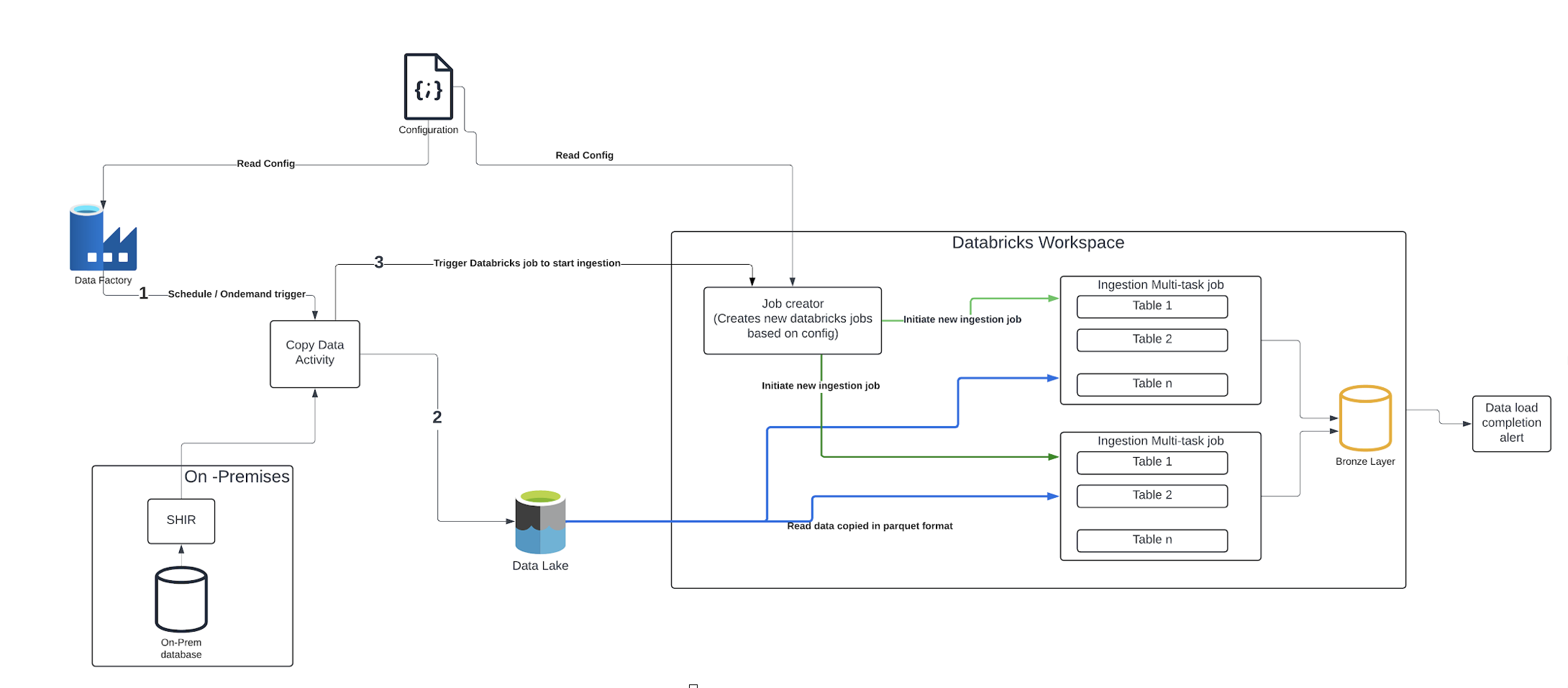
Pre-requisites
- SHIR deployment: Install Self hosted integration runtime on a Virtual Machine with connectivity to on-premises data sources.
- Storage Account Setup: Configure an Azure Storage account accessible from both ADF and Databricks.
High level steps
- Configuration Management:
- Create a configuration file with source and destination table details.
- Store configuration in a shared storage account which is accessible from ADF as well from databricks.
- ADF Pipeline Orchestration:
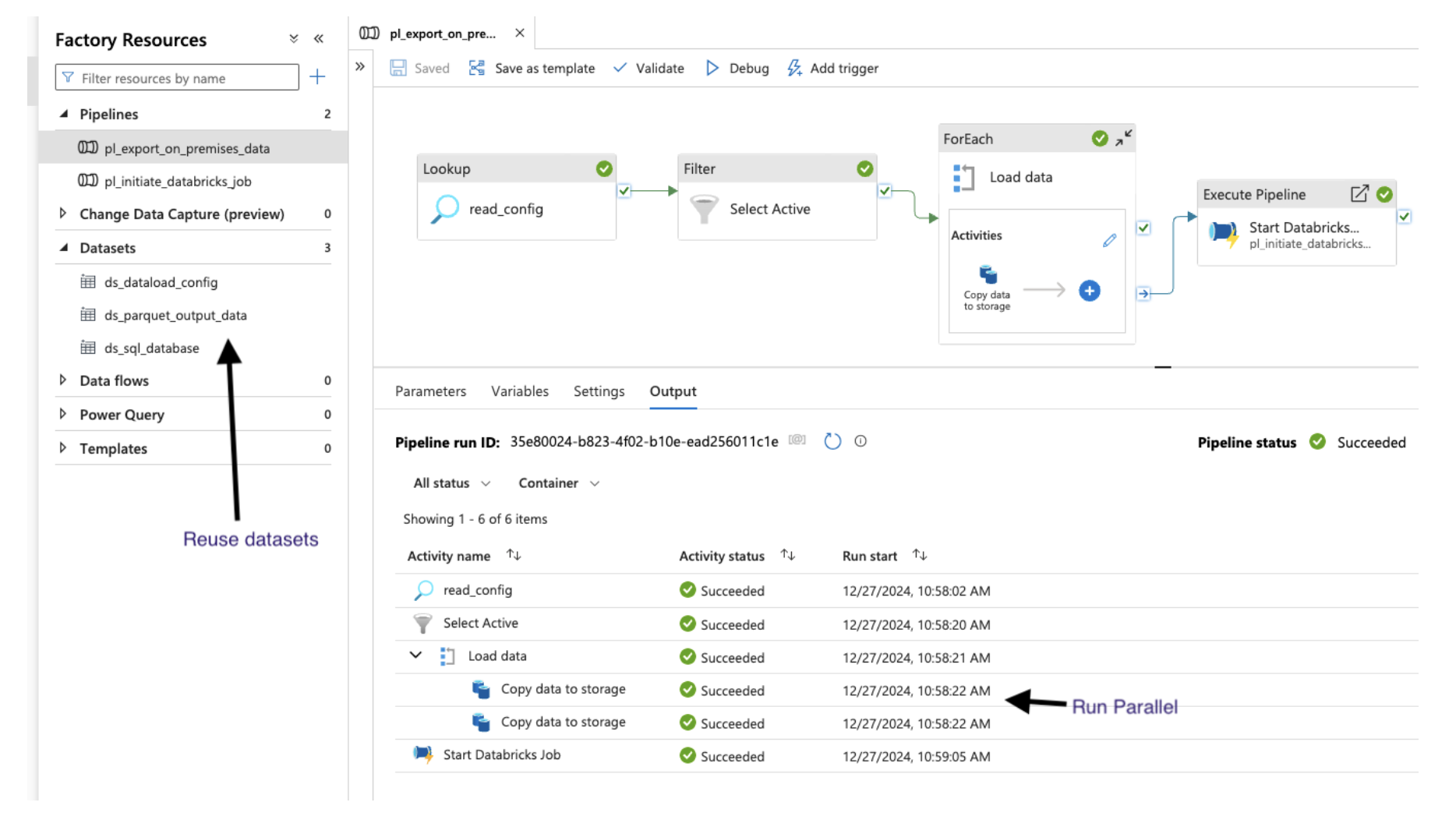
- Trigger the ADF pipeline, passing the configuration file path as a parameter.
- The pipeline dynamically generates and executes multiple parallel copy data activities.
- These activities extract data from on-premises sources and store them in Parquet format within the shared storage account.
- Parallelism is controlled to minimize load on both source systems and SHIR.
- Databricks Job Initiation:
- Upon successful data extraction, the ADF pipeline invokes the Databricks API to trigger a "job_creator" job.
- Databricks Job Creation:
- The "job_creator" job reads the configuration file and dynamically creates a new Databricks multi-task job.
- This multi-task job parallelizes the loading of exported data from the shared storage account into the Databricks bronze layer.
2. Sample Configuration File
(can be extended to include multiple other settings)
[
{
"source_database": "edw",
"source_table": "customer",
"source_filter_condition": "",
"target_catalog": "uson",
"target_schema": "bz_edw",
"target_table": "customer",
"isActive": "true",
"group_id" : "edw_group_1"
},
{
"source_database": "rpt",
"source_table": "orders",
"source_filter_condition": " WHERE TRUNC(created_date) = TRUNC(SYSDATE - 1);",
"target_catalog": "uson",
"target_schema": "bz_rpt",
"target_table": "orders",
"isActive": "true",
"group_id" : "edw_group_2"
}
]
3. ADF Pipeline
Output in storage account
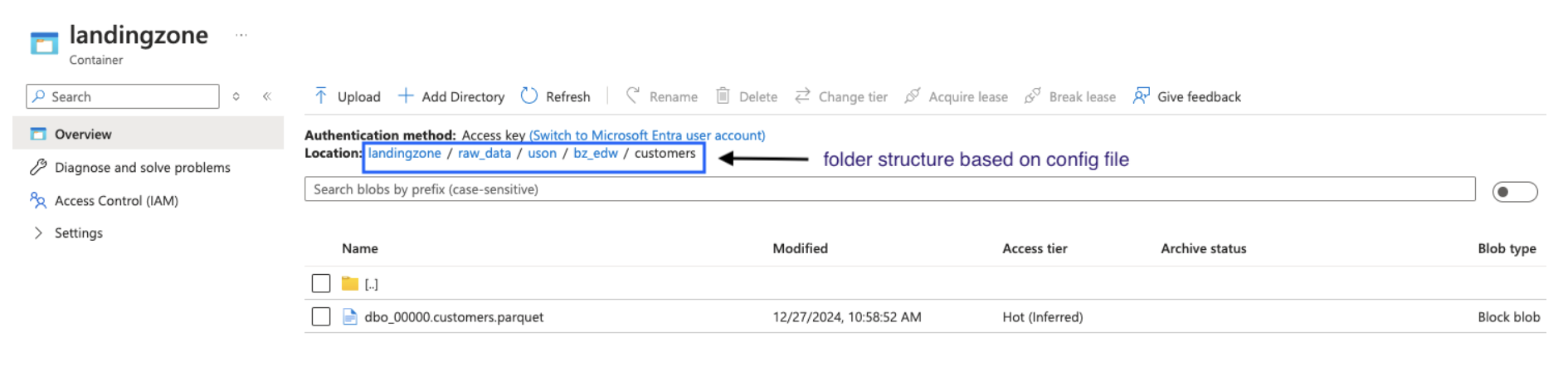
The data reading process can be optimized based on the specific source system. For instance, techniques like physical table partitions or dynamic range partition properties within the copy data activity can be leveraged to enhance performance.
For detailed guidance on executing Databricks jobs from Azure Data Factory, refer to this comprehensive blog post:
This blog post offers a step-by-step approach to constructing a modular ADF pipeline that can execute any Databricks job using built-in ADF activities and managed identity authentication. It also covers integrating the ADF Managed Identity as a contributor within your Databricks workspace.
4. Upload to databricks
Once the data is available in the storage account as Parquet files, Databricks is utilized to load it. As depicted in the architecture diagram, two workflows are involved: job_creator and ingestion_multitask_job.
job_creator: This job, triggered by the ADF pipeline via the JOBs API with a JSON configuration file path as input, dynamically creates a new ingestion_multitask_job. This process leverages the Databricks SDK to generate and execute notebook tasks, enabling parallel data loading for multiple tables.